Design Your Spooky Event with a Modern Flyer Template
That feeling when the plans are set, the venue is booked, and the playlist is coming together—but you still need to get the word out. Whether it's a neighborhood trick-or-treat route, a haunted house fundraiser, or a themed nightclub party, the first thing people see is your promotional material. A well-designed flyer isn't just a piece of paper; it's the visual handshake that invites your community in. It needs to capture the eerie, fun, or sophisticated vibe of your event instantly, all while being clear and professional. For many organizers and designers, starting from a blank canvas can be the biggest hurdle, especially when time is tight.
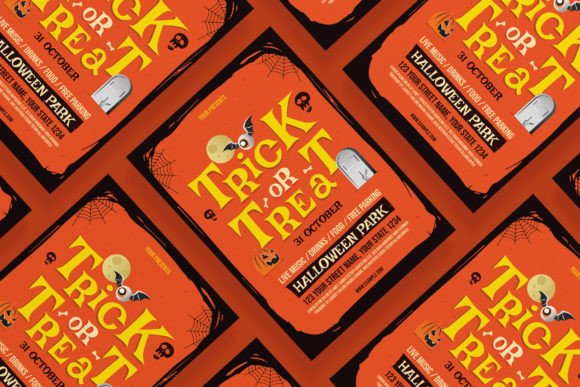
This is where a versatile design asset like the Trick or Treat Flyer Template Set becomes invaluable. It’s more than just a pre-made layout; it’s a foundational toolkit built for flexibility and modern appeal. The set is designed with a contemporary aesthetic that feels fresh and engaging, avoiding the cliché, overly cartoonish Halloween looks that can make an event seem dated. Its strength lies in its clean structure and editable nature, providing a professional starting point that you can then infuse with your own brand's personality or the specific atmosphere you're aiming for.
More Than a Single Sheet: A Multi-Platform Promotion Kit
Think about how you discover events today. You might see a poster at a local coffee shop, scroll past an Instagram Story while waiting in line, or get a targeted ad in your Facebook feed. A successful promotion campaign needs to be consistent across all these touchpoints. This is the core advantage of a comprehensive template set. It’s not just providing a standard A4 flyer; it’s equipping you with a coordinated suite of materials.
The included files cover the essential bases for both print and digital promotion. The A4 size (8.27 x 11.69 inch) is perfect for traditional posters, bulletin boards, and handouts. But the modern additions are what make this set particularly practical. The Instagram Post (1080 x 1080 pixel) template is optimized for the square format that dominates social feeds, ensuring your key details aren’t cropped awkwardly. Meanwhile, the Instagram Stories (1080 x 1920 pixel) version leverages the full-screen, vertical format that’s ideal for immersive, attention-grabbing announcements. Having these pre-sized and designed to work together means your branding stays cohesive, whether someone is looking at a printed poster or their phone screen. This kind of visual consistency is fundamental to building brand recognition, even for a one-off event.
Unpacking the Design: Flexibility for Your Brand Identity
A template’s true value is measured by how easily it adapts to your vision. This set is built on a framework of 100% vector graphics, which is a significant technical advantage. Vector files, like the included Adobe Illustrator (.Ai) and Photoshop (.PSD) formats, allow you to scale elements infinitely without losing quality. This means you could use the same design elements for a tiny web graphic or a large-format banner without any pixelation.
The practical benefits for customization are extensive:
- Edit Everything: All text, images, and colors are in editable placeholders. You can swap out the sample text for your event details, change the color scheme to match your brand palette, and insert your own imagery or logo. This transforms the template from a generic design into a piece of your brand identity.
- Professional Quality: With CMYK color mode and 300 DPI resolution, the files are print-ready. This eliminates the guesswork and potential for costly errors when sending your design to a printer. The well-organized layers in the files make navigation and editing straightforward, even for those with intermediate design software experience.
- Accessible Design: The use of only free fonts is a thoughtful touch. It means you won’t need to purchase additional typefaces to complete the design, and you can legally use the final product for commercial purposes without worrying about font licensing issues. This is a crucial consideration for small businesses and entrepreneurs.
Practical Applications for Creators and Businesses
The versatility of a strong template extends far beyond a single event. For graphic designers, it’s a time-saving asset that can be repurposed for multiple clients with different themes. A small business owner could use the same foundational layout for a Halloween sale, a fall festival, or a seasonal menu launch, simply adjusting the colors and imagery each time to maintain a recognizable visual language.
Consider these real-world uses:
- Content Creators & Bloggers: Use the Instagram templates to promote a Halloween-themed blog post, a YouTube video, or a podcast episode. The cohesive look across Stories and feed posts can boost engagement and click-through rates.
- Event Planners & Venues: Nightclubs, community centers, and restaurants can quickly generate professional promotional materials for themed nights, ensuring the typography and layout communicate the right level of fun or sophistication.
- Marketing Professionals: For agencies or in-house teams, having a go-to set of design assets for seasonal campaigns streamlines the workflow. It ensures all materials, from email headers to social ads, have a unified look, strengthening the overall campaign message.
The key is to view the template as a starting point for your creative font and design choices. While the template provides a structure, your customization—your choice of specific wording, your brand's accent colors, and the photos you select—is what will make it uniquely effective for your audience.
Making It Your Own: Tips for Effective Customization
To get the most out of a resource like this, a strategic approach to customization is best. Don’t just change the words; think about the message and the audience.
First, match the mood to your event. The template’s modern style is a blank slate. Using a stark black, white, and orange color scheme creates a classic Halloween feel. Swapping those for deep purples, blacks, and metallic silvers can instantly evoke a more upscale, mysterious nightclub vibe. The editable color feature is your primary tool for setting this tone.
Second, prioritize readability. Even the most stunning design fails if people can’t quickly find the date, time, and location. Use the template’s hierarchy to your advantage. The main event title should be the most prominent, with essential details in a clear, legible typeface. Avoid the temptation to use overly ornate script fonts for critical information. A good practice is to test your final design by viewing it at a small size or from a distance to ensure key details pop.
Finally, think beyond the immediate event. Could you use the same visual framework for a "Thank You" post after the event? Could the layout adapt for a "Save the Date" for next year? By maintaining the core design elements, you build a recognizable thread that can turn a one-time attendee into a familiar follower. In a crowded digital space, that kind of professional presentation and consistency helps you stand out and makes your marketing efforts more efficient in the long run.

![Master Your Year with the 2023 Simple Calendar [Sunday] Design](/images/master-your-year-with-the-2023-simple-calendar-sunday-56.jpg)