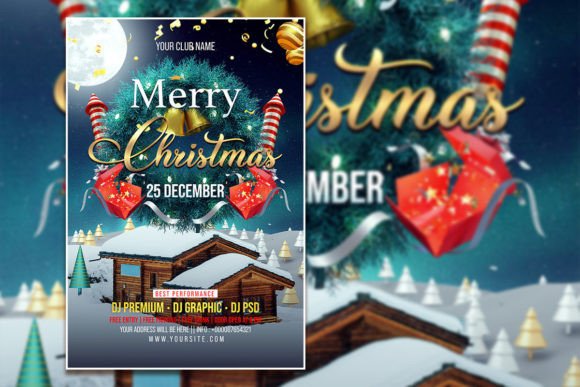
Design Your Holiday Magic: The Christmas Flyer Template
The air gets crisp, the lights go up, and suddenly every business, community center, and family is planning something special. But in the flurry of holiday preparations, one task often gets pushed to the last minute: creating that perfect invitation or promotional piece. You know the one—it needs to capture the festive spirit, look professionally designed, and be ready to print or share online without a headache. This is where a thoughtfully crafted Christmas Flyer or Poster Template becomes your secret weapon, transforming a stressful design task into a simple, creative process.
A Foundation Built for Festive Flexibility
At its core, a premium template is more than just a pretty picture with text boxes. It’s a structured design system. Consider the specifications of a high-quality option: a generous 2000 x 3000 pixel canvas at 300 dpi ensures your final print looks sharp and vibrant, not pixelated. The RGB color mode is perfect for both digital screens and modern print services, offering a wider, more vivid color gamut than CMYK for this kind of vibrant holiday artwork. Being a fully organized PSD file for Adobe Photoshop means every element—from the snowy background to the ornate border—is on its own layer. This isn’t just convenient; it’s empowering. It gives you granular control to change colors, move decorative elements, or even swap out the entire background image with a photo from your own celebration last year.
This level of editability is crucial for anyone needing to maintain visual consistency across materials. A small business can use the same template for their in-store poster, a Facebook event cover, and an email newsletter header simply by adjusting the dimensions and focus, ensuring their holiday campaign looks cohesive and professional. The ability to instantly replace text means the same design can serve a dozen different purposes: a corporate party invite, a church service announcement, a neighborhood cookie swap, or a festive sale promotion for an online store. It’s a single design asset that fuels an entire season of communication.
Beyond the Invitation: Practical Applications for Creatives and Businesses
While “flyer” might suggest a simple handout, the applications for this type of editable PSD template stretch far and wide. For the graphic designer or freelancer, it’s a client-saver. Instead of building a holiday design from scratch under a tight deadline, you can present a polished concept in minutes, then customize it to match the client’s brand identity—swapping out the default script font for their corporate sans-serif, adjusting the accent colors to their brand palette, and adding their logo.
Small business owners and entrepreneurs can leverage it for powerful marketing assets. Imagine a bakery using it for a “Christmas Cookie Box Pre-Order” poster. Or a boutique retailer creating a series of social media graphics for a “12 Days of Christmas Sale,” each day featuring a different product photo in the central image frame. The template’s structure guides the design, ensuring each post is balanced and eye-catching, which boosts audience engagement. It can even be adapted for packaging—think of a gift tag or a special holiday label for products.
For content creators and bloggers, it’s a tool for seasonal branding. Create a festive banner for your website, design a Pinterest pin to promote a holiday recipe post, or craft an Instagram Story template for countdowns and announcements. The consistent use of the template’s style—its specific border art, color scheme, and typographic feel—reinforces your personal brand’s holiday aesthetic, making your content instantly recognizable in a crowded feed. It’s about creating a visual shorthand for the season that your audience learns to associate with your unique offerings.
Making It Uniquely Yours: The Editable Advantage
The true value lies in the phrase “all text can be edited.” This means you’re not stuck with “Merry Christmas” if your event is a “Winter Solstice Gathering” or a “New Year’s Eve Gala.” The font itself is a critical component of the template’s personality. A swirling, elegant script font conveys tradition and formality, perfect for a black-tie event. A bold, modern display font with a retro vibe might be better for a fun, family-friendly carnival. The template provides the foundation, but you direct the tone.
Here’s a practical workflow: open the PSD file. Use the Text Tool to select a headline. Replace the sample text with your own. Notice how the font’s weight, spacing, and style affect the message’s impact. If the pre-set font doesn’t match your brand’s voice, you can easily change it. This is where understanding font pairing becomes useful. You might keep the decorative script for the main headline but switch the event details to a clean, highly readable sans serif font to ensure clarity for dates, times, and addresses. The template’s organized layers make this experimentation safe and easy—you won’t accidentally break the design.
Don’t forget the power of the image placeholder. Dragging and dropping a high-quality photo of your team, your product, or a relevant festive scene instantly personalizes the design. This customization transforms a generic template into a piece that feels authentically yours, which is fundamental for brand recognition and building a connection with your audience.
Choosing and Using Your Holiday Template Wisely
When selecting a template, look beyond the initial “wow” factor. Scrutinize the details. Is the layer structure logical and well-named? Are the colors easy to edit via adjustment layers or shape layers? Does the file include a help guide or link to font sources if you wish to match them exactly? Always check the licensing terms, especially for commercial use. A reputable template will come with a license that allows you to use the final design for promotional materials, whether digital or print, without legal worry.
Remember that a template is a starting point, not a finished product. The goal is to use it as a scaffold to build upon. Test different color combinations. Try swapping the main graphic element—perhaps replace a snowflake with a holly branch. Adjust the layout by moving text blocks to see if a different composition feels more dynamic. The best templates encourage this kind of creative exploration within a safe, professional framework.
This holiday season, let your focus be on the event itself—the gathering, the celebration, the sale—rather than getting bogged down in design software. A robust, fully editable Christmas Celebration Flyer Template provides the professional polish you need, the flexibility you crave, and the time savings you deserve. It’s the practical tool that helps you spread the word effectively, so you can get back to what truly matters: enjoying the festive cheer.

![Master Your Year with the 2023 Simple Calendar [Sunday] Design](/images/master-your-year-with-the-2023-simple-calendar-sunday-56.jpg)
