Mastering Email Signatures: Design, Branding, and Editable Templates
That professional email you're about to send has one final, critical touchpoint: the signature. It's not just contact information; it's a digital business card, a brand statement, and a subtle marketing tool all in one. A cluttered, generic, or pixelated signature can undermine the credibility you've built in your message. Conversely, a clean, well-designed signature reinforces your brand identity, looks impeccable on any device, and provides clear pathways for engagement. For designers, entrepreneurs, and marketers, creating these assets from scratch for every client or campaign is time-consuming. This is where a versatile, pre-designed solution becomes invaluable, streamlining the process while ensuring professional results.
The Anatomy of a Professional Digital Business Card
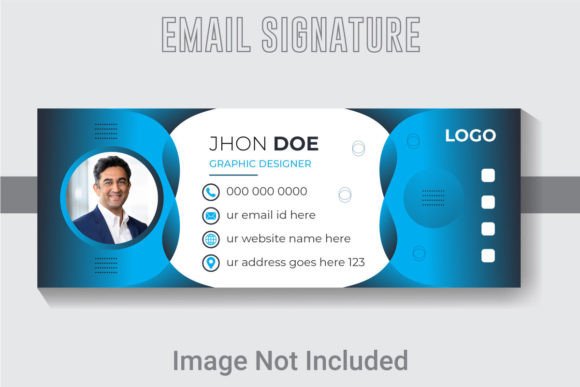
A compelling email signature template is more than just a layout; it's a system built for consistency and adaptability. The specifications of a high-quality template are crucial. A design canvas of 851x315 pixels strikes a perfect balance, providing ample space for logo, text, and social icons without overwhelming the email client. Working in RGB color mode ensures colors display accurately across screens, while a resolution of 300 DPI guarantees that any elements—like a sharp logo—will appear crisp and clear, even if the signature is saved as an image file.
The true power for a creative professional lies in the editability. A template where the AI (Adobe Illustrator) text, fonts, and colors are fully editable transforms a static file into a dynamic design asset. You're not locked into the designer's original choices. Need to match a client's specific brand hex code? Simple. Want to swap the font to a script style for a boutique bakery? Done. This level of control is what separates a basic template from a premium design resource. Furthermore, a well-layered and organized file structure is a lifesaver. Imagine trying to edit a complex design with every element on one layer—it's a recipe for frustration. Organized layers mean you can isolate and modify the logo, contact information, or social media icons with surgical precision, saving hours of project time.
Beyond the Inbox: A Multipurpose Branding Powerhouse
While its primary home is in your email footer, the components of an editable signature template have far-reaching applications. Think of it as a foundational brand identity kit. The consistent use of logo, color palette, and typography established in your signature should echo across all your marketing assets. That clean sans-serif font you selected for your contact details? Use it for the subheadings on your website. The accent color from your social media icons? Incorporate it into your packaging design or digital product graphics. This creates a cohesive visual language that strengthens brand recognition.
For a small business owner, this consistency is gold. Your email signature, Instagram graphics, and business card should feel like they belong to the same family. A well-designed template provides the blueprint. The logo placement and typography hierarchy within the signature can directly inspire your approach to social media graphics or even the layout of a simple flyer. It’s about creating a system, not just a one-off design. The template becomes a reference point, ensuring that whether you're creating a Pinterest pin or a trade show poster, the visual DNA of your brand remains intact.
Practical Design Choices: From Font Pairing to Readability
Selecting the right typography is paramount. The included fonts in a template are a starting point, not a mandate. Your choice should reflect the brand's personality. A law firm might benefit from a classic serif font for a sense of tradition and authority, paired with a clean sans-serif for contact details. A tech startup might lean into a modern, geometric sans-serif throughout. For a creative blog or artisan shop, a handwritten or script font for the name could add a personal touch, balanced by a highly readable sans-serif for the smaller text.
When editing your template, prioritize readability above all else. The most beautiful font is useless if people can't quickly scan your phone number or website. Test your chosen typeface at the actual size it will appear. Avoid overly decorative or thin fonts for crucial information. Consider how the text looks against different email client backgrounds—some may strip out background colors. A practical tip is to always test your final signature by sending emails to various accounts (Gmail, Outlook, Apple Mail) and viewing them on both desktop and mobile. This real-world check can reveal issues with alignment, image blocking, or font rendering that you wouldn't catch in your design software.
Leveraging Your Asset: Files and Commercial Considerations
A comprehensive template package typically includes multiple file formats to cover all use cases. The AI (Adobe Illustrator) file is your master editable source, ideal for making deep customizations. The EPS file offers broad compatibility with other vector software, ensuring flexibility. The JPG provides a ready-to-use, high-quality image version. Understanding the minimum software requirement, such as Adobe Illustrator CS6 or above, is important for workflow compatibility.
Crucially, for any designer or business owner, is understanding the licensing. The fact that the template uses "free fonts" is a significant benefit, but you must verify the specific license of those fonts. Are they free for commercial use? Can they be embedded in digital products? This due diligence protects you legally down the line. When you use this template to create signatures for clients, you are providing them with a final product, but the original editable file remains your design asset, licensed for your use in creating those end products. Always read the license terms of any design asset you purchase to ensure it aligns with your intended use, whether for personal projects, client work, or merchandise.
In the end, an easy-to-edit email signature template is more than a convenience; it's a strategic tool. It enforces brand discipline, saves valuable creative time, and provides a professional polish that communicates attention to detail. By understanding its components, applying its design principles across your brand ecosystem, and making thoughtful typographic choices, you transform a simple sign-off into a powerful element of your visual communication strategy.