Digital Marketing Agency Facebook Cover: A Template for Instant Credibility
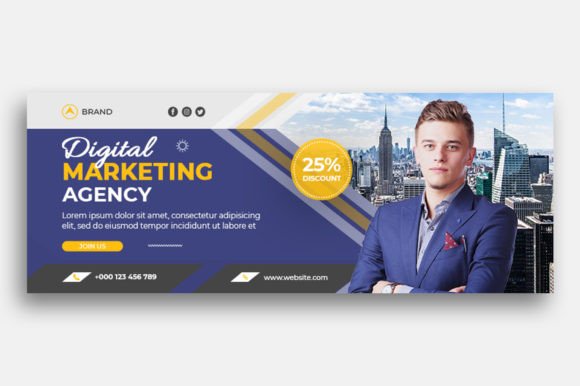
Scrolling through a cluttered Facebook feed, your agency’s page has about three seconds to make a first impression. Before a potential client reads your bio or clicks your services tab, they see your cover photo. If that space is a generic stock photo or a blurry, poorly sized graphic, it signals a lack of attention to detail—exactly the opposite of what a digital marketing agency should project. A polished, professional Facebook cover isn't just decoration; it's the digital equivalent of a firm handshake and a well-designed business card. For agencies, freelancers, and marketing consultants, this visual real estate is prime branding territory, and having a clean, editable template to work with can streamline your workflow and elevate your online presence instantly.
Why a Dedicated Template Beats Starting from Scratch
Building a social media graphic from a blank canvas in Photoshop can be time-consuming, especially when you’re focused on client campaigns and strategy. A pre-optimized template like this one solves that. Designed at the exact Facebook cover dimensions (820x312 pixels) and a crisp 300 DPI, it ensures your design looks sharp on every device, from desktop monitors to mobile screens. The RGB color mode is standard for digital displays, guaranteeing colors render correctly. Because it’s a PSD file, you retain full control over every layer—swap the background image to reflect a recent campaign, adjust the text to announce a new service, or tweak the color palette to align with a seasonal promotion. This flexibility is invaluable for maintaining a dynamic and current social media presence without needing advanced design skills.
More Than Just a Facebook Header: Versatile Applications
While its primary function is as a Digital Marketing Agency Facebook Cover, the clean, professional layout of this template has uses that extend far beyond a single social platform. Think of the core design—a balanced composition of imagery and text space—as a foundational asset for your brand identity.
- Social Media Graphics: Adapt the layout for Twitter headers or YouTube channel art. The principles of visual hierarchy and clean typography apply across all platforms.
- Website Hero Images: Use the same visual language on your agency’s homepage to create a seamless experience for visitors moving from your social profile to your site.
- Presentation Slides: The design can inspire the title slide of a client pitch deck, reinforcing your agency’s aesthetic from the first click.
- Marketing Collateral: Elements from the template can be repurposed for digital ads, email newsletter headers, or even printed one-pagers for networking events.
- Internal Branding: Create a sense of cohesion by using the design style for internal project briefs or team communication graphics.
This approach to visual consistency is what separates amateur efforts from professional brand recognition. When your audience sees a coherent style across your Facebook page, website, and presentations, it builds trust and makes your agency more memorable.
The Typography Advantage: Communicating with Clarity
A major strength of this template is its use of a free font, which is a huge practical benefit. Typography is the voice of your design, and choosing the right typeface is critical. For a digital marketing agency, you typically want fonts that convey modernity, clarity, and professionalism. A clean sans serif font often works well for headlines and key messaging, offering excellent readability at a glance. You might pair it with a simple serif or another sans serif for any subtext to create a sophisticated font pairing.
When you edit the template, consider your messaging. Is your agency data-driven and technical? A geometric sans serif might fit. Are you more creative and brand-focused? A slightly more stylized but still readable display font could work. The key is to ensure the text remains legible against the background image. Use the template’s layer structure to add a subtle overlay or adjust text color for maximum contrast. This attention to detail in your typography directly impacts audience engagement; people are more likely to read and act on text they can easily comprehend.
Practical Editing Tips for a Polished Result
You don’t need to be a Photoshop expert to make this template your own. Here’s a straightforward approach:
- Open the File: Launch the PSD in Photoshop. Familiarize yourself with the Layers panel—each text element and the image placeholder should be on its own layer.
- Update the Image: Find the layer labeled for the background image. Right-click it and choose “Replace Contents.” Select a high-quality photo relevant to your agency—perhaps your team at work, a clean office space, or an abstract graphic that represents your services. Ensure the new image is high-resolution to maintain the 300 DPI quality.
- Edit the Text: Double-click the text layers to select them. Change the wording to your agency’s name, a compelling tagline, or a current call-to-action like “Schedule Your Free Audit.” Use the Character panel to adjust font size, spacing, and color if needed.
- Refine and Export: Tweak the positioning of elements for balance. Once satisfied, go to File > Export > Export As, choose PNG or JPG for web use, and ensure the dimensions remain 820x312 pixels.
This simple process allows you to create a professional presentation for your agency’s most visible social asset. It’s a practical application of design assets that saves time and ensures quality.
Building a Cohesive Brand Toolkit
Using this Facebook cover template is a single step in a larger strategy. Your agency’s brand identity is built from many such assets—the logo, color scheme, typography, and imagery style. When these elements work in harmony, they create a powerful and recognizable presence. Consider creating a simple brand guide that documents the font used in this template, your primary color codes, and the style of imagery you employ. This ensures that whether you’re updating your Facebook cover, designing a social media graphic for a client case study, or creating marketing assets for a webinar, every piece feels like it comes from the same trusted source.
In the competitive landscape of digital marketing, projecting professionalism and clarity is non-negotiable. A well-executed Facebook cover, built on a clean and adaptable template, is a foundational tool. It communicates your agency’s competence before you even say a word, allowing you to focus on what you do best: delivering results for your clients.